Open the page for any bill in Congress and you will find the same thing: a list of cosponsor names.
Sometimes a few dozen. Sometimes a few hundred.
Last name. First name. State. Party. Date signed.
It is accurate. It is official. It is also hard to read.
A list does not show the shape of support. Is this broad backing, or a handful of early signatures? Is the bill truly bipartisan, or mostly one party? Is support still growing, or did it stall after introduction?
You can work that out from a table. But a 200-row list is not how most people understand a coalition.
So we built a way to see the coalition.
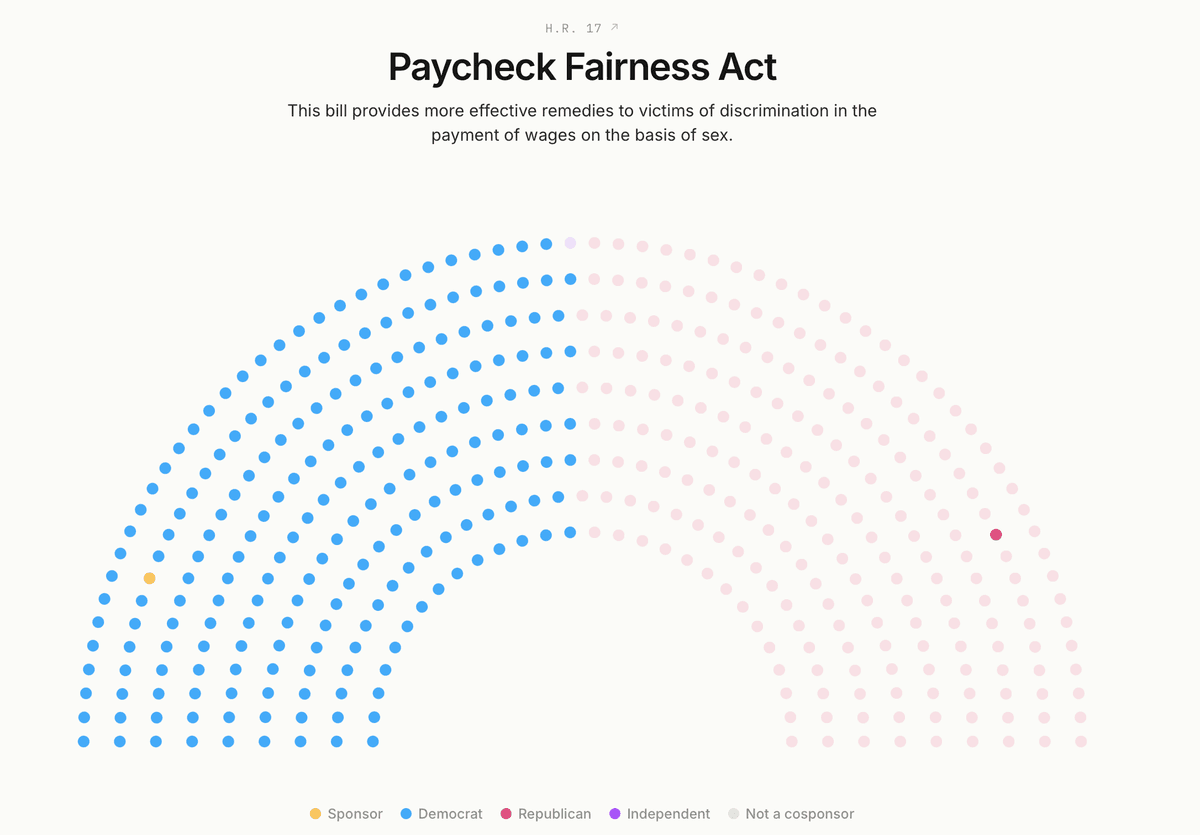
It is called the Hemicycle, and it maps cosponsorship in the 119th Congress onto a chamber-style view of every member.
What you are looking at
Pick a bill.
The Hemicycle lays out all 435 House members, or 100 senators, in a half-circle view. Then it fills in.
Gold marks the sponsor, the member who introduced the bill.
Party-colored dots mark cosponsors as they sign on.
Faint gray dots show everyone who has not signed.
The chamber fills in by cosponsorship date, so you can watch the coalition form in the order it happened.
A bill that gains 80 cosponsors in its first week looks very different from one that takes six months to reach the same number.
On a list, both are "80 cosponsors."
On the Hemicycle, one fills in fast. The other builds slowly. You see the difference right away.
For targeting, the gray dots matter most. They show the members who have not signed on yet. That is the gap. That is your next target list.
Open the Improving Seniors' Timely Access to Care Act and watch support fill in from both parties. It reads as a coalition before you read a single name.

Try it on any bill in the 119th Congress: search it, and watch support build by sponsor, party, and date.
Cosponsorship is a signal
A cosponsor map does not tell the whole story.
A cosponsor does not guarantee a bill will pass. It does not replace committee movement, leadership support, timing, or the other forces that shape an outcome.
But it does show something real.
It shows where support has been put on the record. It shows which offices are willing to attach their name to an issue. It shows whether support is broad or thin, bipartisan or concentrated, early or late.
That is what the Hemicycle is built to show.
What a count leaves out
A cosponsor count is useful. But it flattens the details that matter when you are briefing a board or planning a campaign.
Take the word "bipartisan."
A bill with 40 cosponsors from one party and 2 from the other is technically bipartisan. But the balance tells a different story.
The Hemicycle makes that balance visible. If support sits mostly on one side, you can see it. If support spans both parties, the chamber fills in from both sides.
That distinction matters for advocacy teams with limited time. A single-party bill may still be worth backing. But it is a different campaign than a bill with broad cross-party reach.
The map is just as clear at the other end. A bill with no cosponsors appears as one gold dot in an open chamber. If it is a bill your organization cares about, you can see how much work is still ahead.
How advocacy teams can use it
Read the bill before you back it. Before your organization endorses a bill, joins a coalition letter, or asks members to act, pull it up. See how broad the support is. See when it grew. Do not rely only on the headline count.
Brief your board in one image. Leadership does not need a spreadsheet. They need to know whether the issue is moving. A filled-in chamber can show the health of a bill faster than a table.
Build your target list from the gray. The members who have not signed are right there. They are the missing support. Start there.
Watch momentum, not snapshots. Because the map builds by date, you can see whether support is recent or stale. A bill adding cosponsors this month is different from one that stopped moving months ago.
The fastest way to understand the Hemicycle is to load a bill your organization already tracks. You will know right away whether the picture matches the story you have been telling.
Every view is deep-linkable and works on a phone, so you can send a bill in Slack or email and the person on the other end lands on the same chamber.
The bigger idea
Legislative data is not hard to find. It is hard to read.
The official record gives you every sponsor and cosponsor on every bill. But the record is inert until someone turns it into a decision.
Most advocacy tools begin at the action form. The Hemicycle begins one step earlier, at the decision: where should we act?
And the campaign that follows runs on the same data the map does. A Legisletter campaign ingests the bill, the votes, and the cosponsors, so it knows where each legislator stands. The letter can change with the target. Thank the members who signed on. Press the ones who have not.
A campaign aimed at supporters is different from one aimed at holdouts. The map helps you tell them apart before you spend money, staff time, or supporter energy.
Go look at a bill you care about at legisletter.org/hemicycle.
The gray dots will tell you where the next campaign should begin. When you are ready to run it, Legisletter sends the right letter to the right office.
Built for Government Relations
Give your clients measurable grassroots impact at a fraction of the cost of legacy platforms.